
Chart the mouth by voice, with your hands on the patient.
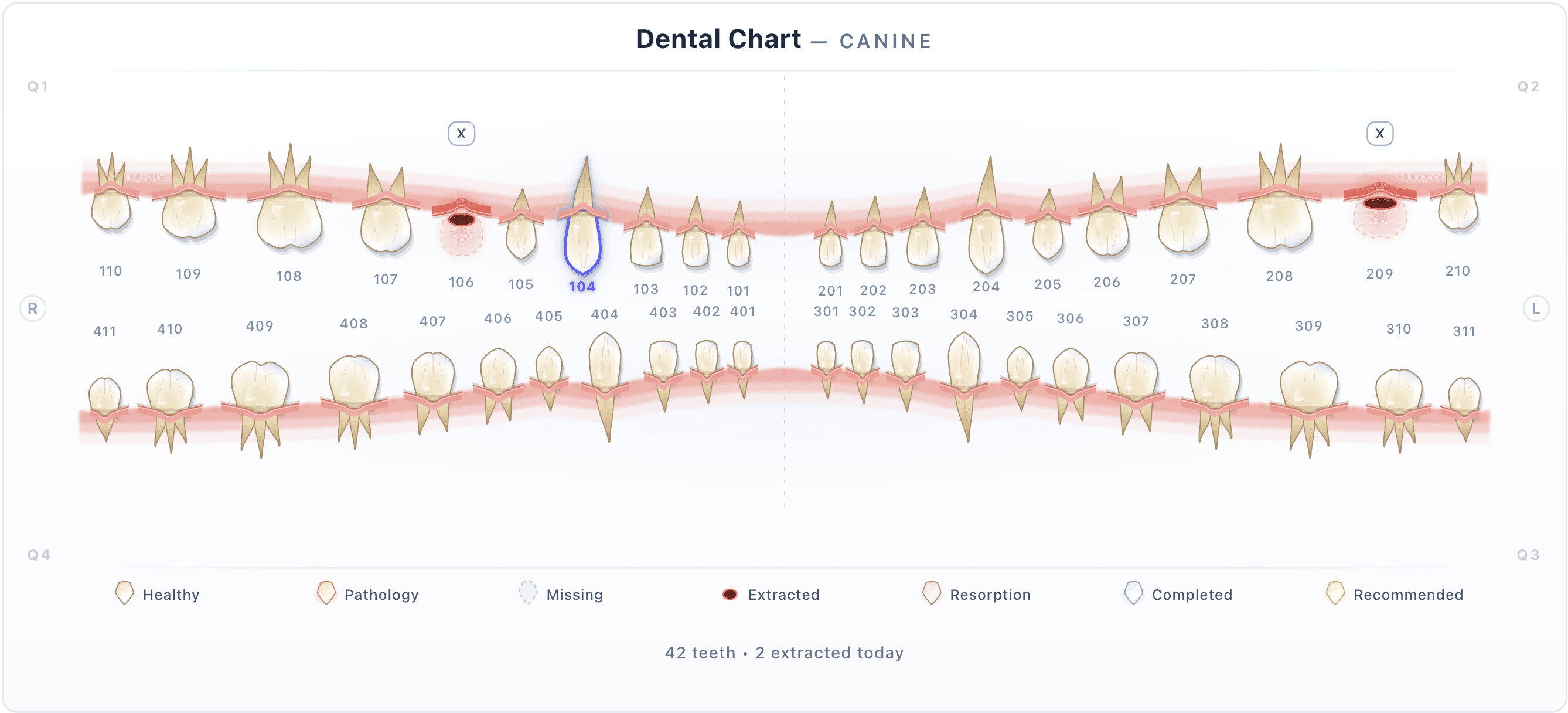
An interactive Triadan chart for dogs and cats. Tap a tooth, or say it out loud during anesthesia, and the findings, probing depths and procedures land on the right tooth. Complete the chart and the extractions bill themselves.
- 42 + 30canine and feline teeth, drawn anatomically
- 6 sitesprobing depths per tooth, species thresholds built in
- Voicelive charting under anesthesia, clinician-confirmed
- PDFprint or email the finished chart to the owner
Everything a dentistry day produces, on the tooth it belongs to.
No paper chart to scan, no free-text block to decode next year. Each tooth carries its own status, findings, measurements and procedures.
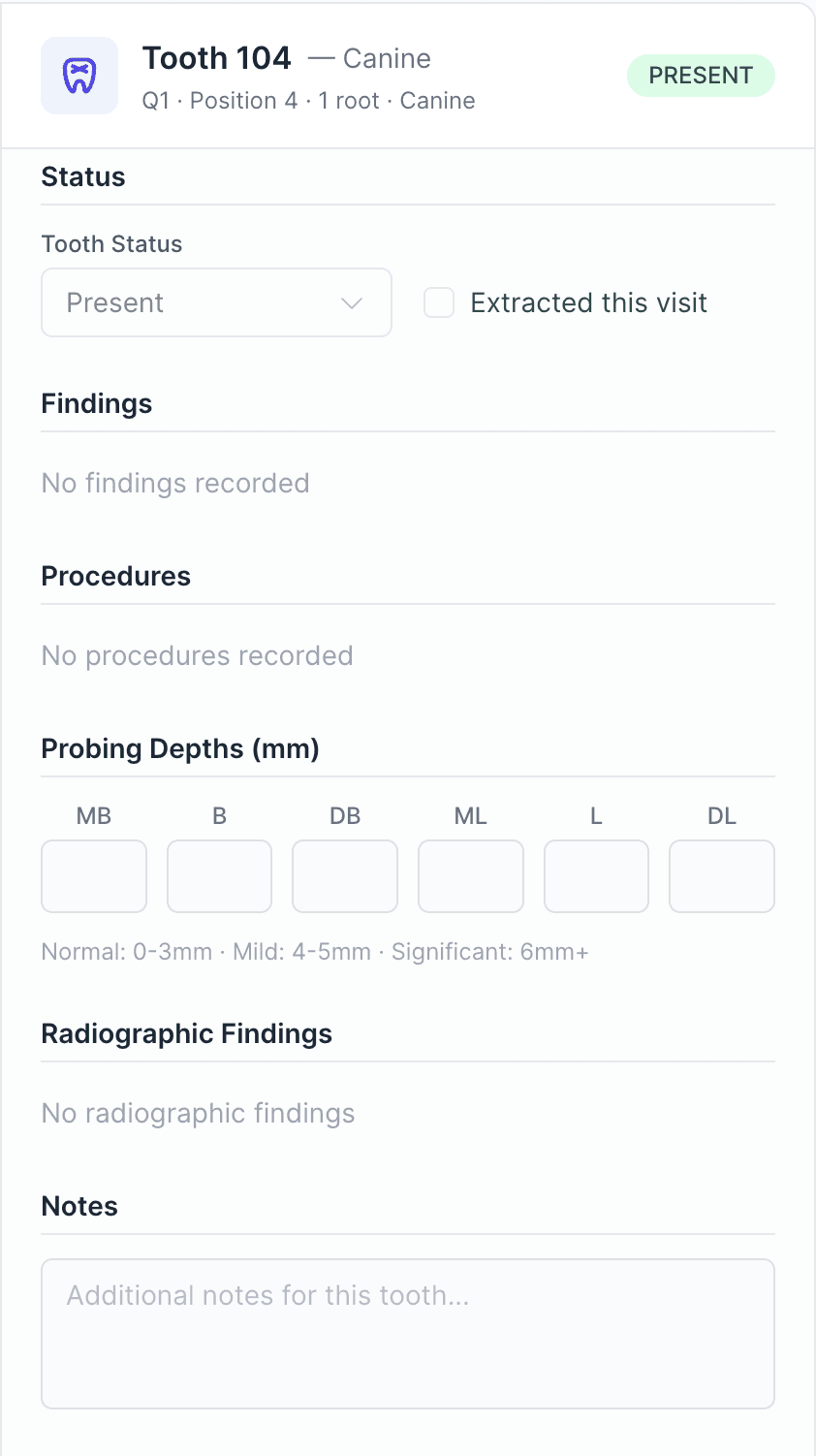
- Status per tooth.Present, missing, extracted, persistent deciduous or supernumerary. Extracted teeth are marked on the chart and counted in the summary.
- Findings in eight categories.Including mobility, furcation and tooth resorption, each with a stage and a note.
- Probing depths at six sites.Mesiobuccal to distolingual, with canine and feline normal ranges built in. Abnormal depths are flagged as you enter them.
- Procedures, recommended to completed.Eleven procedure types, tracked from recommended to completed. Completed procedures are what the chart bills.
- Radiographic findings, per tooth.Record what the radiographs show against each tooth, next to the clinical findings.
- The whole mouth at a glance.A colour-coded chart for healthy, pathology, resorption, missing, extracted, recommended and completed, and a live summary with the billable total.
Say it. Watch the tooth fill in.
During anesthesia nobody has a free hand for the keyboard. With the Anesthesia AI add-on the chart listens: a wake word, medical speech recognition, and each entry lands on the tooth you named with a confidence score and a review flag.
- Findings, probing depths and notes commit on their own.Only at high confidence, and only on a tooth that exists for the species.
- Procedures and extractions always wait for you.The system never records an extraction without a clinician confirming it.
- A veterinarian signs off before the chart closes.Every voice-charted entry is reviewed and attested before the chart can be completed.
- Not under anesthesia? Record the exam.Bittsi Scribe fills the chart from a recorded oral exam. If the chart already has findings, you choose merge or replace.
Live voice charting is part of the Anesthesia AI add-on. Charting from a recorded exam is part of Bittsi Scribe. Both are on the pricing page.
Complete the chart. The extractions bill themselves.
The chart lives inside the visit, so the work you record is the work you charge for. No second entry on the invoice, no forgotten extraction.
- 1Open the chart from the visit.Created from the SOAP plan and linked to the appointment and the invoice from the first tooth.
- 2Chart by tap or by voice.Findings, probing depths, procedures and radiographic findings, per tooth, with the summary and the billable total updating as you go.
- 3Complete the chart, and it bills.Every completed procedure linked to a service item posts a treatment and an invoice line, and sets the patient's next dental reminder.
- 4Reopen it if something changes.Completed charts are read-only. Reopen one and the charges and reminders reverse cleanly; complete it again and they post again.
- Viewing and managing charts are separate permissions you assign per role.
- A visit with a dental chart cannot be voided or moved to another patient by accident.
- Included with the Standard plan. No per-chart fee.
Straight answers.
Which species does the dental chart support?
Dogs and cats, using modified Triadan numbering: 42 teeth for a dog and 30 for a cat, each drawn with its real crown shape and root count. A chart can be labelled permanent, deciduous or mixed dentition, and a persistent deciduous tooth is recorded as a status on that tooth.
Does the chart bill the procedures?
Yes. When you complete a chart, every completed procedure that is linked to a service item posts a treatment and an invoice line, and sets the patient's next dental reminder. Reopening the chart reverses them.
How does voice charting work, and what does it commit on its own?
With the Anesthesia AI add-on you say the tooth and the finding out loud during the procedure. Findings, probing depths and notes commit automatically only at high confidence and only on a valid tooth. Procedures and extractions always wait for your confirmation, and a veterinarian signs off on the voice-charted entries before the chart can be completed.
Can I attach dental radiographs?
Not yet. Radiographic findings are recorded as typed entries against each tooth; the images themselves stay in your imaging system.
Can the pet owner see the chart?
You can print it or email it as a PDF at the end of the visit. A snapshot of the finished chart is also filed to the patient's record.
Is the dental chart included in my plan?
It is included with the Standard plan, alongside the Treatment Sheet, the Anesthesia Sheet and analytics. Foundation clinics can upgrade at any time.
See a dentistry charted live.
A veterinarian on our team charts a mouth in front of you: by tap, then by voice, then completes the chart and shows you the invoice it produced.